
Accounting firms›Modules›Pre-accounting
Pre-accounting module

Your clients' documents, ready to post.

Invoices arrive in Fidly, AI suggests the coding, you validate. The entries go to your accounting software, with no re-keying.
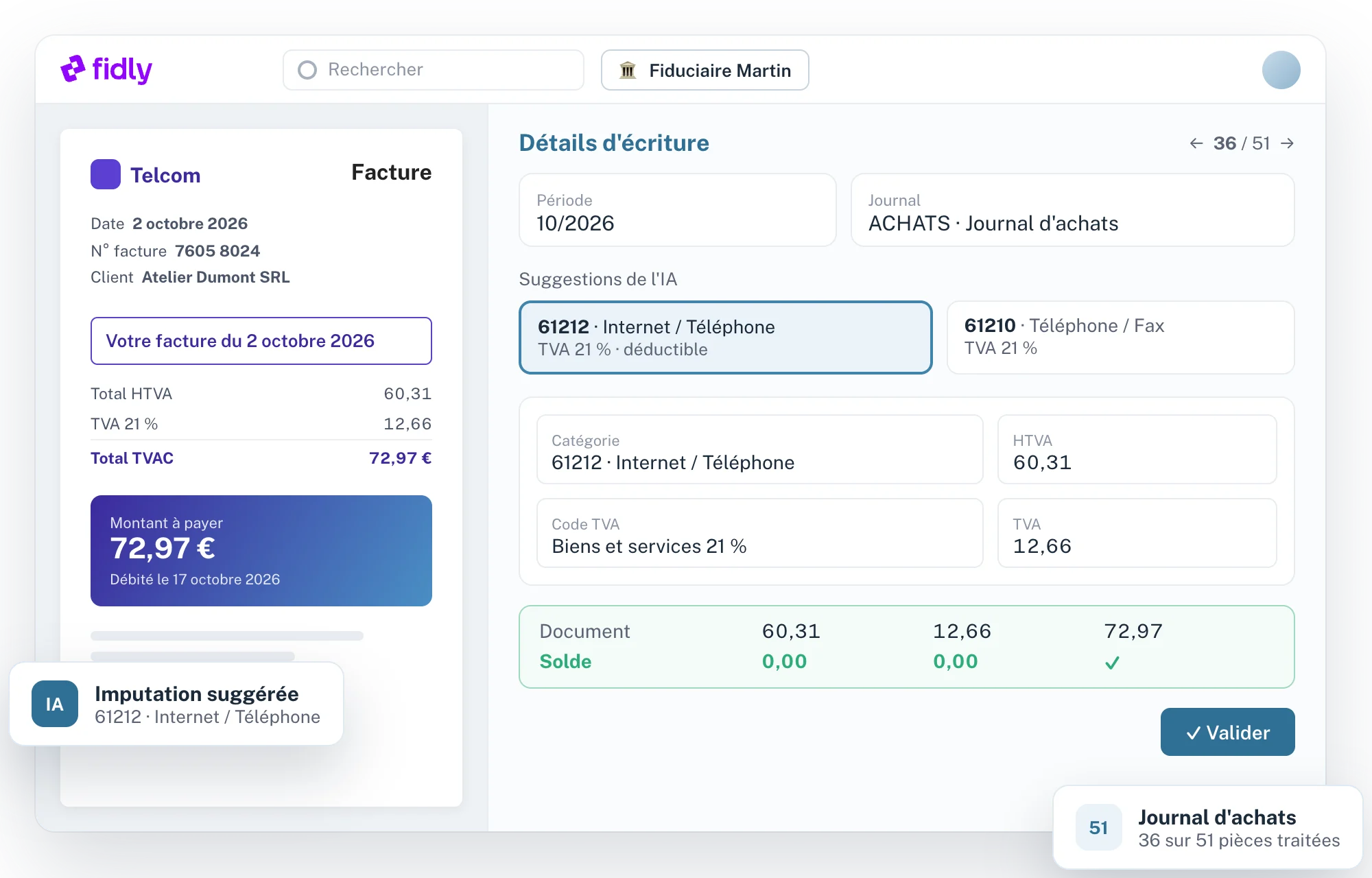
✓ AI-suggested coding
✓ Synced with your software
✓ Duplicate detection
✓ Period closing
Fidly : pré-comptabilisation des documents
At a glance
01

From document to entry, with no re-keying.

Fidly reads each document, suggests the account, VAT code and journal from your chart of accounts, and lets you validate in one click.

01

Document reading

Amounts, dates, number and supplier read from every invoice.

02

Suggested coding

Account and VAT code suggested from your chart of accounts and the file's history.

03

Duplicates filtered out

Duplicate documents are detected before export.

04

Synchronisation

Third parties, journals, accounts and VAT codes taken from your accounting software.

How it works
02

Four steps, from document to export.

1

Documents arrive

Uploaded by your clients via Fidly or Fidly Link, or added by the firm.

2

Fidly suggests

Third party, account, VAT code and journal, with split lines.

3

You validate

Document by document or in batches; hold and labels for anything that needs another look.

4

Export

Validated entries go to your accounting software, with your journals' numbering.

Imputation suggérée par l'IA
Suggested coding
SupplierTelcom
Account61212
VAT21% deductible
Total€72.97
Technical specifications
03

What the module covers, point by point.

01

Documents

4 items
–
Sources
Documents uploaded by your clients (Fidly, Fidly Link) or added by the firm.
Reading
Amounts, dates, invoice number and third party read automatically.
Duplicates
Duplicate document detection, with manual override.
File tracking
Documents to process, on hold and validated, file by file.
02

Coding

4 items
–
AI suggestions
Account, VAT code and journal suggested for each document.
Splitting
Several lines per document, with balance check.
Third parties
Third-party recognition, created if needed.
Labels and hold
Label a document or put it on hold for later.
03

Accounting software

4 items
–
Synchronisation
Third parties, journals, accounts and VAT codes taken from your software.
Existing entries
Journal entries brought in, for context and numbering.
Numbering
Numbering format of each journal, detected from your entries.
Export
Validated entries sent one by one or in batches.
04

Periods and settings

3 items
–
Periods
Closing and reopening accounting periods.
Archiving
Archived documents and searchable history.
Settings
Settings shared across the firm and specific to each file.
For your clients
04

Your clients choose how involved they are.

Your choice

Nothing, or Fidly Link

You add the documents yourself, or your clients upload them via Fidly Link, the version that connects them only to you.

Optional

Business space

Clients who invoice in Fidly approve their invoices, and they arrive straight in your pre-accounting.

FAQ
05

Questions about the Pre-accounting module.

Which accounting software does Fidly work with?
Fidly syncs with your accounting software: third parties, journals, accounts and VAT codes. Request a demo to check yours.
How does the AI suggest the coding?
Based on your chart of accounts, the third party and the file's history. You always stay in control before validating.
Do my clients have to use Fidly?
No. You can add the documents yourself, or your clients upload them via Fidly Link.
What happens with duplicates?
Fidly flags them before export: you decide whether to discard or keep them.
Can I use only the Pre-accounting module?
Yes. Each module is switched on separately, and you add the others whenever you like.
Which accounting software does Fidly work with?
Fidly syncs with your accounting software: third parties, journals, accounts and VAT codes. Request a demo to check yours.
How does the AI suggest the coding?
Based on your chart of accounts, the third party and the file's history. You always stay in control before validating.
Do my clients have to use Fidly?
No. You can add the documents yourself, or your clients upload them via Fidly Link.
What happens with duplicates?
Fidly flags them before export: you decide whether to discard or keep them.
Can I use only the Pre-accounting module?
Yes. Each module is switched on separately, and you add the others whenever you like.
Which accounting software does Fidly work with?
Fidly syncs with your accounting software: third parties, journals, accounts and VAT codes. Request a demo to check yours.
How does the AI suggest the coding?
Based on your chart of accounts, the third party and the file's history. You always stay in control before validating.
Do my clients have to use Fidly?
No. You can add the documents yourself, or your clients upload them via Fidly Link.
What happens with duplicates?
Fidly flags them before export: you decide whether to discard or keep them.
Can I use only the Pre-accounting module?
Yes. Each module is switched on separately, and you add the others whenever you like.
Chloé, from the Fidly team
Hi, I'm Chloé,
A question about Fidly, its features or getting set up? I'm here to advise and support you.
Talk to us
Free demo · No commitment

See the module with your own documents.

A demo focused on one of your files, with your questions.