
Tasks module · Coming soon

All of the firm's deadlines, tracked file by file.

VAT, CIT, advance tax payments, annual accounts, UBO: each client gets their tasks 12 months ahead, with your steps and their own dates. The team moves forward step by step, and you see delays at a glance. The module is in the works.
✓ Ready-to-use Belgian tasks
✓ Your own templates
✓ 12 months ahead
○ In the works
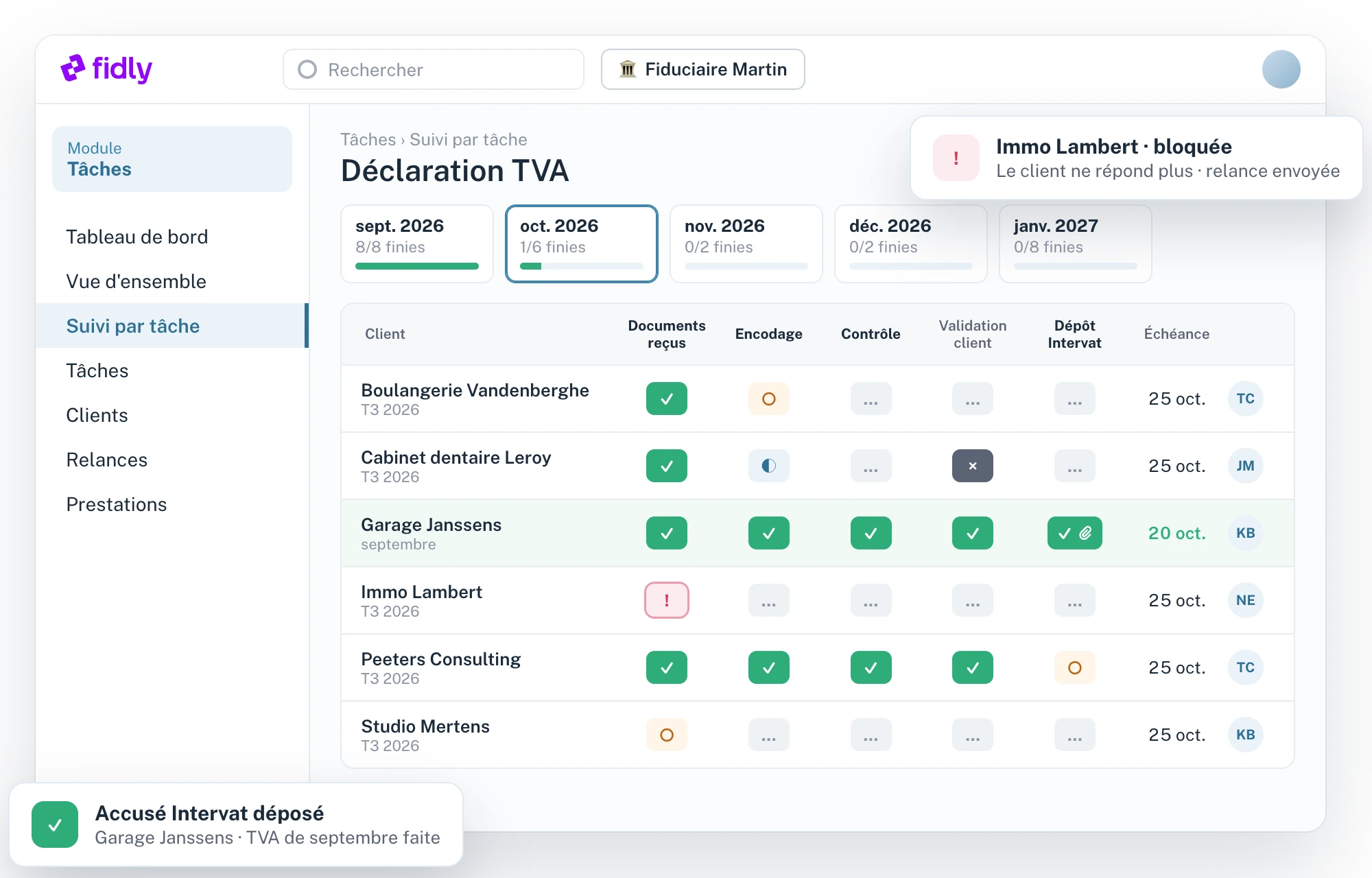
Écran Suivi par tâche de Fidly : la déclaration TVA d'octobre, une ligne par client, une colonne par étape, avec les étapes faites, en cours, bloquées ou jamais pour ce client.
At a glance
01

The firm's work, visible at a glance.

The Tasks module will bring together each client's obligations, their deadlines and the progress of every step, without spreadsheets. It is in the works.

01

Ready-made catalogue

VAT, client listing, CIT, advance tax payments, annual accounts, UBO: standard tasks with their steps and legal deadlines.

02

Your way

Your templates for the whole firm, then adjustments client by client: steps, order, dates.

03

12 months ahead

Each task exists as soon as it falls within the next 12 months: assign it, link a document, tick off a step done early.

04

Oversight

List, kanban, client view and step-by-step tracking: delays and blockers on a single screen.

How it works
02

How it will work, in four steps.

1

Choose your tasks

From the Fidly catalogue, or your own templates: your steps, your calendars, your fields.

2

Add them to your clients

In one click, with the right calendar (monthly or quarterly VAT) and the client's dates: financial year-end, general meeting.

3

Deadlines are created

12 months ahead, with their steps. The file manager is assigned automatically.

4

The team moves forward

When a step is finished, the next one moves to “To do”. Delays and blockers are visible to everyone.
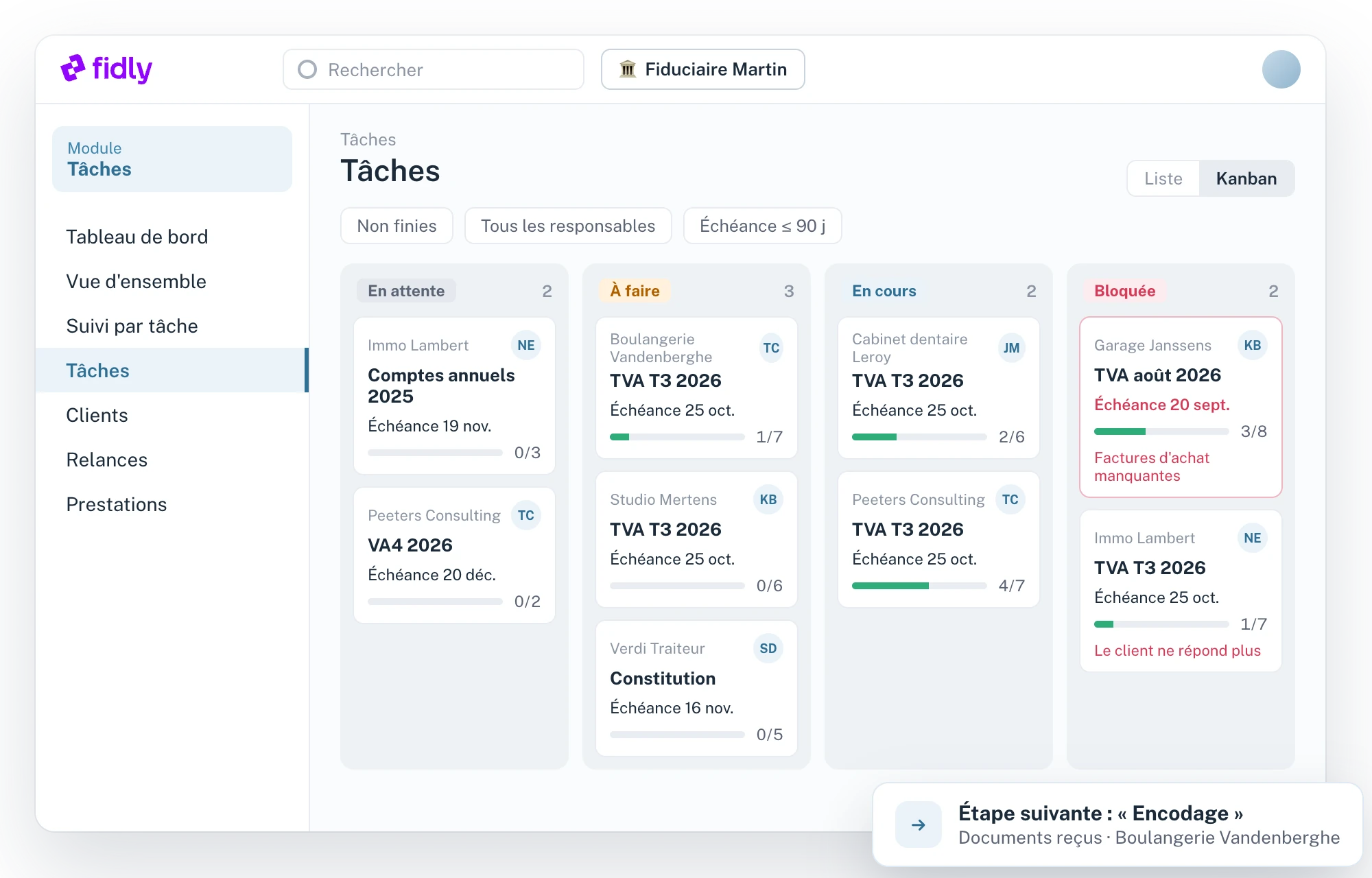
Vue kanban des tâches de Fidly : colonnes En attente, À faire, En cours et Bloquée, avec l'échéance, l'avancement et la raison du blocage.
VAT return · Q3 2026
Data entry✓
Review✓
Intervat filing25/10
Progress2 / 3
Planned specifications
03

What the module will cover.

01

Catalogue and templates

Planned
–
Fidly tasks
VATClient listingCITAdvance tax paymentsAnnual accountsUBO registerIncorporation
Your templates
Copy a Fidly task or start from scratch: steps, calendars and fields specific to the firm, reused for all your clients.
Updates
When a template changes, your clients receive the changes as a proposal: you accept client by client, or for everyone at once.
02

Deadlines

Planned
–
Calculation
End of period, start or end of the financial year, GM date, plus an offset: every legal deadline calculates itself.
Per client
Each client has their own dates, irregular financial years included, and monthly or quarterly VAT. A date set by hand is no longer recalculated.
12 months ahead
Tasks are created as soon as their deadline falls within the next 12 months; beyond that, the schedule remains visible.
One-off
Company incorporation, a client request: a single task, with a deadline entered by hand.
03

Steps and statuses

Planned
–
Per client
Remove, reorder or rename a client's steps. A “Never for this client” step stays visible, greyed out.
Sequence
The first step is “To do”; when it's finished, the next one takes over. Steps can also run in parallel.
Statuses
To doIn progressOn holdDoneNot neededNever for this client
Closing
Only mandatory steps count towards completing a task.
Blocking
A blocked step carries its reason (“the client has stopped responding”) and appears in the blocked tasks.
04

Team and tracking

Planned
–
Owner
The file manager is assigned automatically, with a possible exception per task. When the file changes hands, unfinished tasks follow.
Views
Dashboard, list, kanban, client-by-task overview and step-by-step tracking, month by month.
Bulk operations
Change a step, a duration or a date rule for all your clients on a task, in one go.
Fields
Fields specific to each task, such as the VAT balance, filled in at each deadline.
History
Every change of status, deadline or owner is dated, with its author.
05

Proof and reminders

Planned
–
Validation by file
Some steps move to “Done” when their proof is uploaded: Intervat receipt, Biztax receipt, GM minutes, NBB filing.
Expected files
The list of documents to gather, step by step, with the mandatory files.
Override
Nothing blocks you: without the file, a justification is enough, and it stays in the history.
Reminders
Ask the client for documents by email, then send reminders on a fixed or escalating schedule. Nothing goes out without your click, and “Received” moves the linked step to “Done”.
06

Time and profitability

Planned
–
Services
Meetings, calls, client requests: scheduled in the calendar or entered afterwards, with their duration and what was done.
Planned cost
Planned duration of each step × the team member's hourly rate: the cost of each file, comparable from one year to the next.
Hourly rates
Default, per role or per person, and dated: a rate increase never rewrites the past.
Optional
A small firm can switch off cost tracking; services remain, with their duration.
For your clients
04

An internal tool for the firm.

At launch

Nothing to change

Tasks stay internal to the firm: your clients don't see them, and nothing they do in Fidly ticks off a step for you.

Coming soon

Document requests

Your requests go out by email, written by you, then reminders follow at your pace. The client receives your message, never the task or its steps.

FAQ
05

Questions about the Tasks module.

When will the Tasks module be available?
It is in the works. Request a demo or contact us to be notified when it launches.
Which tasks will be included?
Monthly or quarterly VAT, client listing, CIT, advance tax payments, annual accounts, UBO register and company incorporation, with their steps and deadlines. You will also be able to create your own.
How will deadlines be calculated?
From the client's period and dates: financial year-end, GM date, irregular financial year. Tasks are created 12 months ahead, and a date can always be set by hand.
Will I be able to use my own processes?
Yes. Create your templates from a Fidly task or from scratch, then adjust the steps and dates client by client.
Will my clients see the tasks?
No. It's an internal tool for the firm. Your clients only receive the document requests you send them by email.
When will the Tasks module be available?
It is in the works. Request a demo or contact us to be notified when it launches.
Which tasks will be included?
Monthly or quarterly VAT, client listing, CIT, advance tax payments, annual accounts, UBO register and company incorporation, with their steps and deadlines. You will also be able to create your own.
How will deadlines be calculated?
From the client's period and dates: financial year-end, GM date, irregular financial year. Tasks are created 12 months ahead, and a date can always be set by hand.
Will I be able to use my own processes?
Yes. Create your templates from a Fidly task or from scratch, then adjust the steps and dates client by client.
Will my clients see the tasks?
No. It's an internal tool for the firm. Your clients only receive the document requests you send them by email.
When will the Tasks module be available?
It is in the works. Request a demo or contact us to be notified when it launches.
Which tasks will be included?
Monthly or quarterly VAT, client listing, CIT, advance tax payments, annual accounts, UBO register and company incorporation, with their steps and deadlines. You will also be able to create your own.
How will deadlines be calculated?
From the client's period and dates: financial year-end, GM date, irregular financial year. Tasks are created 12 months ahead, and a date can always be set by hand.
Will I be able to use my own processes?
Yes. Create your templates from a Fidly task or from scratch, then adjust the steps and dates client by client.
Will my clients see the tasks?
No. It's an internal tool for the firm. Your clients only receive the document requests you send them by email.
Chloé, from the Fidly team
Hi, I'm Chloé,
A question about Fidly, its features or getting set up? I'm here to advise and support you.
Talk to us
Free demo · No commitment

Be among the first to use the Tasks module.

Tell us how your firm is organised: we'll show you what's coming.