
Payroll module

Your directors' remuneration, calculated from A to Z.

Withholding tax, social contributions, benefits in kind, 281 forms and 274 returns: Fidly calculates, you validate, and your accounting software receives the journal entries.
✓ Up-to-date Belgian scales
✓ Instant recalculation
✓ 281.20 and 281.50 forms
✓ Export to Horus, Octopus, Yuki, Soda...
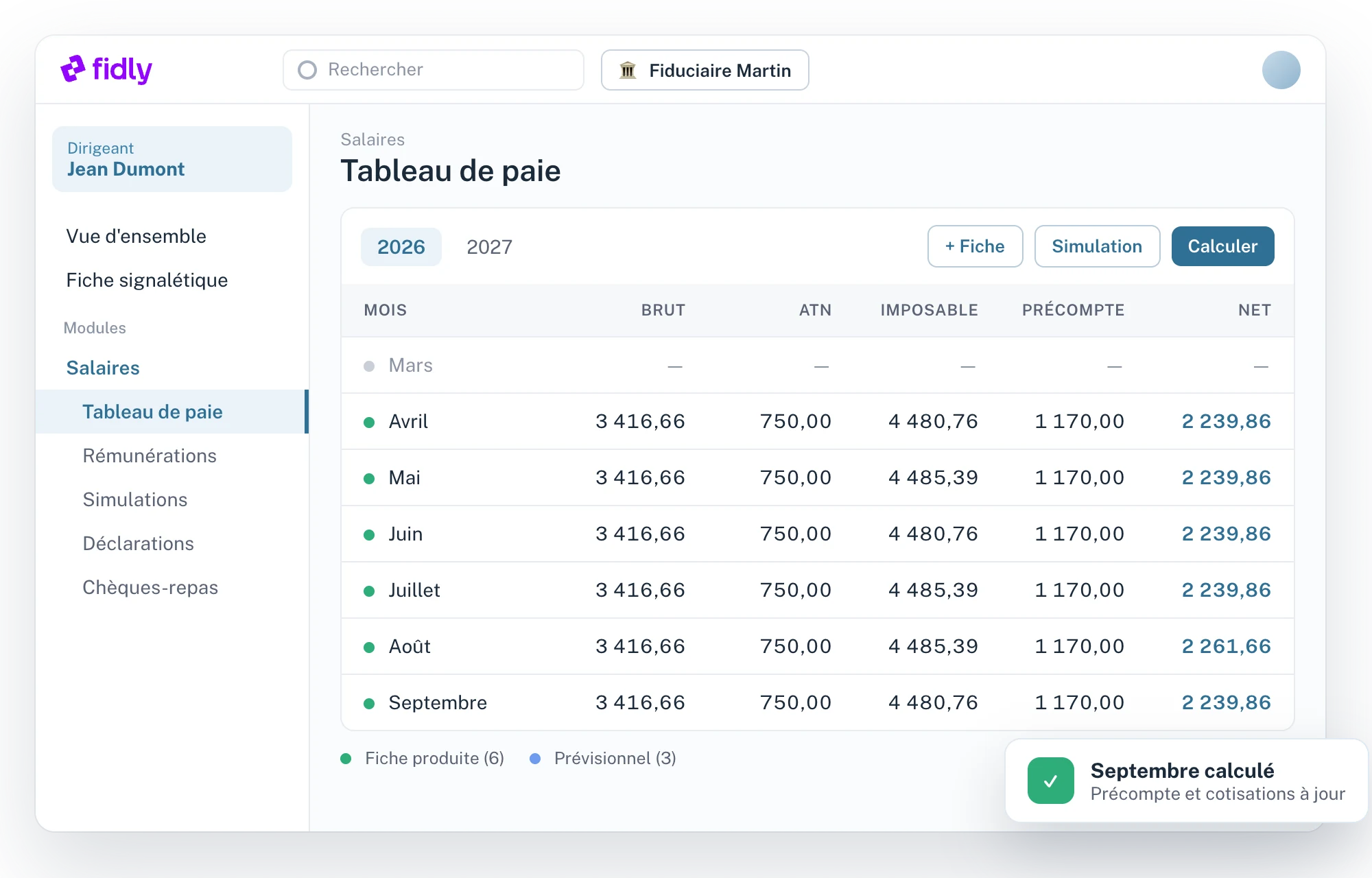
Module Salaires : tableau de paie d'un dirigeant
At a glance
01

A director's entire payroll cycle, in a single table.

Enter the remuneration once. Fidly recalculates the whole year with every change and shows you where each amount comes from.

01

Instant recalculation

The full year is recalculated in under a second, with every change.

02

“Why this amount?”

Click a cell: rule applied, values read, scales and brackets.

03

File check

Points to check come up before the forms and returns are sent.

04

Simulations

Test a raise, a benefit or a taxable income target without touching the actual figures.

How it works
02

Four steps, from gross pay to journal entry.

1

Enter the remuneration

Periodic, non-periodic, benefits in kind, requalified rent, non-taxable items.

2

Fidly calculates

Withholding tax, social contributions and net pay, month by month, over the year.

3

You validate the forms

Standard, amended, late or supplementary: Fidly suggests the right form based on what has already been issued.

4

Returns and accounting

274, 281 forms, meal vouchers and salary journal entries to your accounting software.

Tableau de paie et explication d'un montant
Why €1,170.00 in withholding tax?
Taxable this month4,480.76
Scale applied2026 · single
Reductions− 112.40
Withholding tax1,170.00
Technical specifications
03

What the module covers, point by point.

01

Remuneration

4 items
–
Periodic remuneration
Monthly amount, start and end dates, changes during the year.
Non-periodic remuneration
Bonuses and one-off amounts, assigned to the chosen month.
Non-taxable items
Own expenses and reimbursements, outside the taxable base.
Requalified property income
Rent paid by the company to the director, monthly or annually with its allocation month.
02

Benefits in kind

7 types
–
Supported types
Company carHousingHeatingElectricityPCInternetMobile phone
Value
Calculated by the engine or set to a fixed amount, with the personal contribution paid by the director.
Social contributions
Regime chosen at calculation: benefits included in or excluded from the contribution base.
03

Calculation

4 items
–
Withholding tax
The year's scales, the director's family situation, month-by-month calculation.
Social contributions
Estimate over the year, with amounts that can be forced month by month.
Taxable income target
Monthly gross needed to reach a given annual taxable income, with net rounded to the chosen step.
Issued and upcoming months
Issued months keep their forms; upcoming months are always recalculated.
04

Payslips

4 items
–
Form types
StandardAmendedLateSupplementary
Automatic suggestion
Fidly compares the new calculation with what has already been issued and suggests the right form, month by month.
Validation options
Locked months, combined months, blocked sending.
Sending
Payslip as a PDF, emailed to the director.
05

Returns

274 · 281.20 · 281.50
–
Withholding tax (274)
Monthly or quarterly frequency per company, each director's share, tracking of filing and payment.
281.20 and 281.50 forms
Prepared per company, validated then filed, with corrections and PDFs sent to the directors.
Payment notices
Withholding tax payment notices placed in the company's Fidly space, as an option.
Payroll calendar
Scheduling at firm or file level.
06

Meal vouchers

Monizze · Edenred · Pluxee
–
Entitlement and orders
The director's entitlement and order calendar, year by year.
Providers
MonizzeEdenredPluxee
Affiliation
Check that the company is affiliated with its provider.
07

Accounting

Horus · Octopus · Yuki · Excel
–
Salary journal entry export
To HorusOctopusYukior by email or SFTP as a Soda or Excel file.
Setting
Destination chosen for the whole firm, or file by file.
Chart of accounts
Configurable accounts for salary journal entries.
Tracking
Status of each entry sent, with the option to resend.
08

Checks and reports

3 items
–
“Why this amount?”
For every cell in the payroll table: rule applied, values read, scales and brackets.
File check
Points to check per director and per year, without changing anything.
Reports
Payroll reports for the firm and for each file.
For your clients
04

Your clients don't have to change a thing.

Today

Payslips by email

Payslips go out by email, as they do now. Optionally, withholding tax payment notices arrive in the company's Fidly space.

Coming soon

Payslips in the client space

Payslips will also be available in the Fidly space of your clients who use it.

FAQ
05

Questions about the Payroll module.

Can I use only the Payroll module?
Yes. Each module is switched on separately. Many firms start with their directors' payroll, then add other modules.
Are the scales kept up to date?
Yes. The withholding tax scales and the year's calculation parameters are built into the engine: you have nothing to update yourself.
How do journal entries reach my accounting software?
Choose the destination for the whole firm or file by file: Horus, Octopus, Yuki or an Excel file. Fidly sends the entries and keeps track of them.
Are 281 forms handled in Fidly?
Yes. The 281.20 and 281.50 forms are prepared per company, validated then filed. The PDFs can then be sent to the directors.
How does the director receive their payslip?
By email. Optionally, withholding tax payment notices arrive in the company's Fidly space; payslips will follow there soon.
Can I use only the Payroll module?
Yes. Each module is switched on separately. Many firms start with their directors' payroll, then add other modules.
Are the scales kept up to date?
Yes. The withholding tax scales and the year's calculation parameters are built into the engine: you have nothing to update yourself.
How do journal entries reach my accounting software?
Choose the destination for the whole firm or file by file: Horus, Octopus, Yuki or an Excel file. Fidly sends the entries and keeps track of them.
Are 281 forms handled in Fidly?
Yes. The 281.20 and 281.50 forms are prepared per company, validated then filed. The PDFs can then be sent to the directors.
How does the director receive their payslip?
By email. Optionally, withholding tax payment notices arrive in the company's Fidly space; payslips will follow there soon.
Can I use only the Payroll module?
Yes. Each module is switched on separately. Many firms start with their directors' payroll, then add other modules.
Are the scales kept up to date?
Yes. The withholding tax scales and the year's calculation parameters are built into the engine: you have nothing to update yourself.
How do journal entries reach my accounting software?
Choose the destination for the whole firm or file by file: Horus, Octopus, Yuki or an Excel file. Fidly sends the entries and keeps track of them.
Are 281 forms handled in Fidly?
Yes. The 281.20 and 281.50 forms are prepared per company, validated then filed. The PDFs can then be sent to the directors.
How does the director receive their payslip?
By email. Optionally, withholding tax payment notices arrive in the company's Fidly space; payslips will follow there soon.
Chloé, from the Fidly team
Hi, I'm Chloé,
A question about Fidly, its features or getting set up? I'm here to advise and support you.
Talk to us
Free demo · No commitment

See the module with your own directors.

A demo focused on your directors' payroll, with your questions.